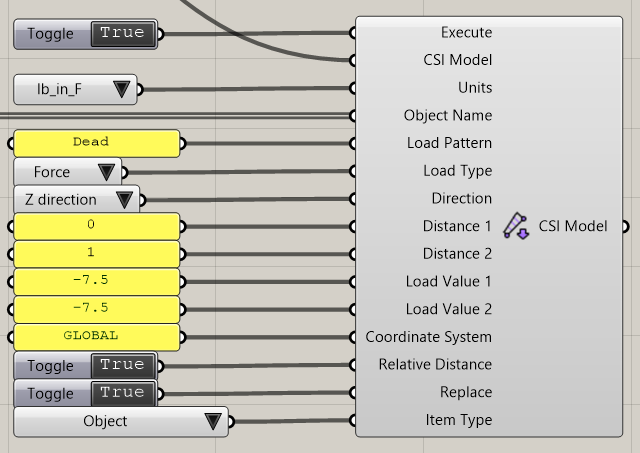
Distributed Frame Load
Assigns distributed loads to frame objects.
Execute: Executes the operation.
CSI Model: CSI Safe model attached to Grasshopper.
Units: Units used to define the distributed load.
Object Name: Name of frame objects or group name in SAFE that the distributed load will be assigned.
Load Pattern: The name of the load pattern for the distributed load.
Load Type: Indicate the type of distributed load on the frame, this can be distributed forces or distributed moments.
Direction: This input parameter indicates the direction of the load. It can be Local 1 Axis, Local 2 Axis, Local 3 Axis, X Direction, Y Direction, Z Direction.
Distance 1: This is the distance from the I-End of the frame object to the start of the distributed load. This may be a relative distance (0 <= Distance 1 <= 1) or an actual distance, depending on the value of the Relative Distance parameter item. [L] when Relative Distance parameter is False.
Distance 2: This is the distance from the I-End of the frame object to the end of the distributed load. This may be a relative distance (0 <= Distance 2 <= 1) or an actual distance, depending on the value of the Relative Distance parameter item. [L] when Relative Distance parameter is False.
Load Value 1: This is the load value at the start of the distributed load. This can be a distributed load per length or Moment per length.
Load Value 2: This is the load value at the start of the distributed load. This can be a distributed load per length or Moment per length.
Coordinate System: This input parameter is Local or the name of a defined coordinate system. It is the coordinate system in which the loads are specified.
Relative Distance: This parameter is optional. If this parameter is True, the specified Distance 1 and Distance 2 parameters are relative distances, otherwise it is an actual distance.
Replace: (Optional) If this item is True, all previous distributed load on frames, if any, assigned to the specified frame object(s) in the specified load pattern are deleted before making the new assignment.
Item Type: If this item is Object, the assignment is made to the frame object specified by the Object Name input parameter. If this item is SelectedObjects, assignment is made to all selected frame objects, and the Object Name input parameter is ignored.
Video
Last updated